Advisory Board Question Workbook
An editable Excel workbook for advisory board questions: plan the sessions, write and check each question, mark pre-meeting survey questions and keep most of each session for discussion.
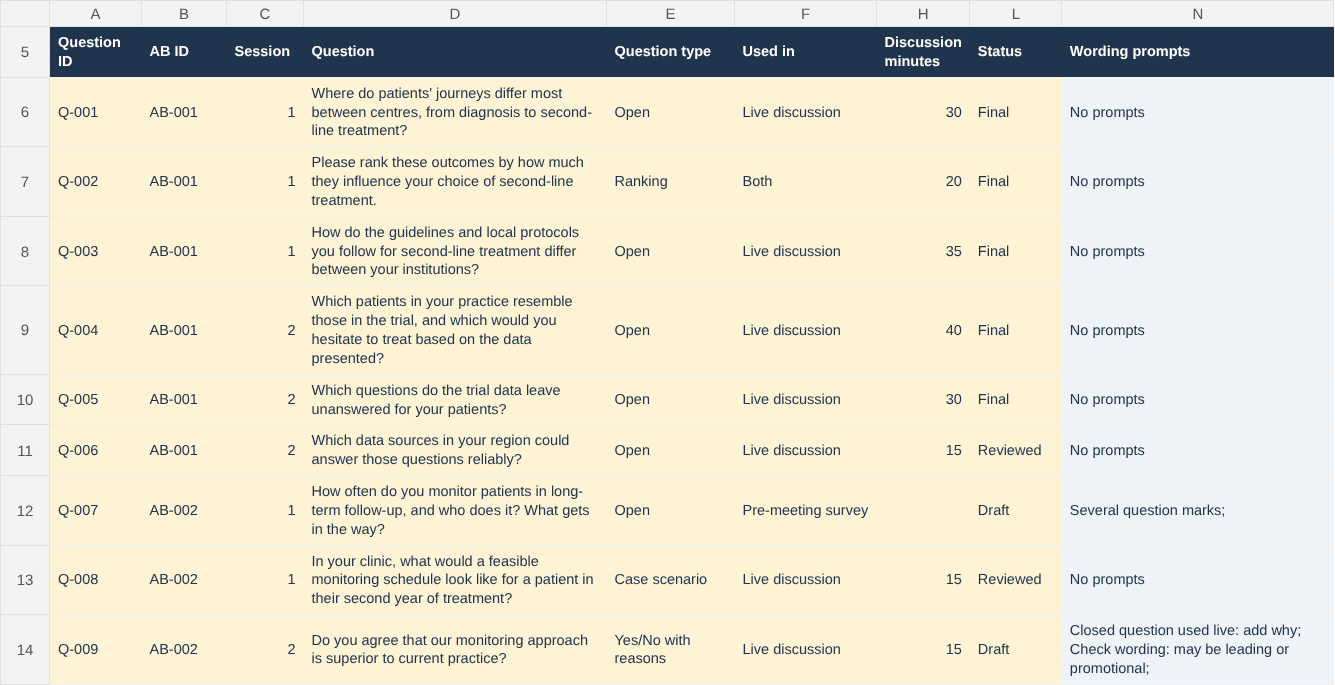
Rendered from the actual workbook. Select a tab to explore; click the image to view it full size.
See the workbook in action
4:21 · English · Fictional examples. The video loads from YouTube only when you press play. Watch on YouTube
From draft questions to a planned meeting
Plan the sessions
One row per session, for example the disease and therapy area, then product data: length, presenter and lecture minutes.
Write the questions
One row per question: session, type, pre-meeting survey or live discussion, the decision it informs, minutes, order and follow-up prompts.
Check wording and time
Wording prompts, an eight-point question check and a time check for every session and the whole meeting.
What’s included
| Tab | What it supports |
|---|---|
| Start Here | Purpose, steps, the optional pre-meeting survey, how the wording prompts work, colour key and how the IDs link to other tools in the series. |
| Questions | Question ID, AB ID, session, question, type, where it is used, decision it will inform, discussion minutes, order, two follow-up prompts and status, with word count, wording prompts and record checks. |
| Sessions | AB ID, session, title, focus, presenter, length and lecture minutes, with discussion minutes, unplanned time, discussion share and a session check. |
| Question Check | Eight Yes or No checks per question, with score, reviewer, date and what to fix. |
| Board Summary | Sessions, meeting length, lecture and discussion minutes, discussion share, question counts and an overall time check. |
| Lists | Editable question types, uses, statuses, session focus, closed question starters, wording to review and the review settings (hidden tab). |
Prepared capacity: 200 questions, 200 sessions and 200 checks.
All cells are editable. Amber cells hold manual inputs; blue-grey cells hold formulas. Overwriting a formula removes its calculation. Clear the fictional rows with Clear Contents before use.
Part of a larger series
Use it after the Advisory Board Concept Note and the Advisory Board Expertise Matrix: the AB ID and Question ID are the same. Next, time the agenda and plan the facilitation with the Advisory Board Agenda and Facilitation Plan. New to advisory boards? Read the free Basics guide What is a medical advisory board?
What to know before use
Wording prompts are simple text checks for long questions, several question marks, closed questions used live and words that often signal leading or promotional wording. They can miss problems or flag harmless wording, so treat them as prompts for review. The discussion share setting (default 60%) is a prompt you can change, not a code limit. No macros, notifications or system integration.
Is a pre-meeting survey required?
No. It is optional good practice. When used, it follows the same neutral wording, contract and approval process as the meeting.
Is the question check a compliance approval?
No. It is a planning aid. Questions, surveys, lectures and materials follow your company’s review and approval procedures and the code that applies to you.
Which software and purchase terms apply?
The file format is .xlsx. Works in Microsoft Excel 2016 or later, on Windows or Mac. No macros. One licence is for one person; for team use, buy one licence per user or email [email protected]. Refunds within 7 days if the file is faulty or not as described and we cannot fix it.
Included workbook: Advisory_Board_Question_Workbook_v1.0.xlsx
Missing something? Tell us which topic, tool or guide you would like next. We read every suggestion. Suggest a topic or tool
Read the approach behind the tool.
The companion article explains how to write advisory board questions and plan sessions, with references.
Read the companion article