Advisory Board Pre-Read Planner
An editable Excel workbook to plan a balanced, focused pre-read pack for an advisory board: why each item is there, reading time, product status, balance and copyright, with a check of the whole pack before it is sent.
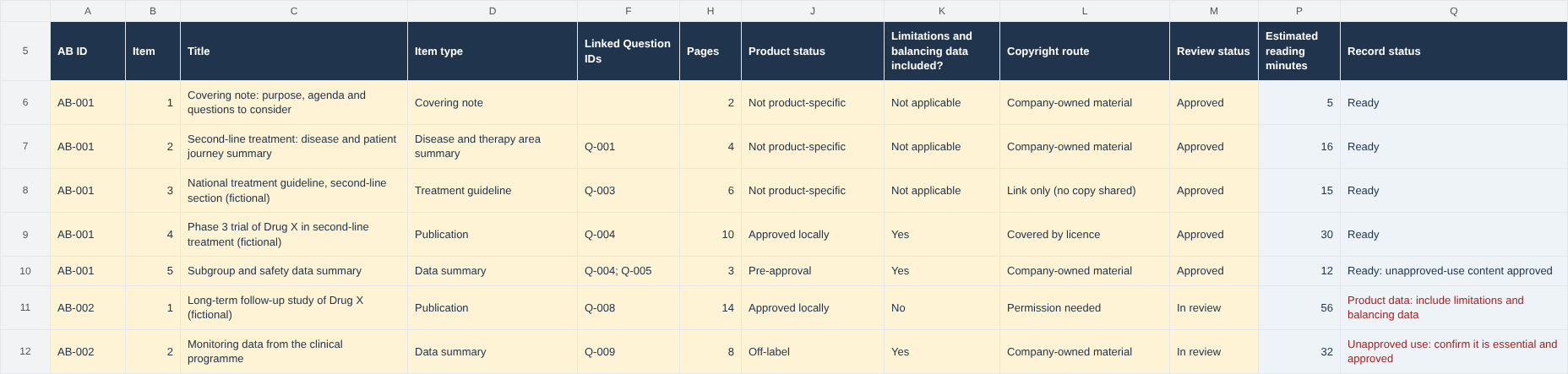
Rendered from the actual workbook. Select a tab to explore; click the image to view it full size.
From a pile of papers to a focused pack
List each item with a reason
One row per item: type, source, linked Question IDs and why advisors need it. Items with no linked question are flagged.
Check balance, status and copyright
Record the product status, whether limitations and balancing data are included, how copyright is handled and whether the item is approved.
Check the whole pack
See total reading time, items not ready and days before the meeting, then answer eight checks for a score and a list of what to fix.
What’s included
| Tab | What it supports |
|---|---|
| Start Here | Purpose, steps, balance and product status, copyright, settings, colour key and how the IDs link to other tools in the series. |
| Pre-Read Items | AB ID, item, title, item type, source, linked Question IDs, why advisors need it, pages, reading minutes, product status, limitations and balancing data, copyright route, review status and approval reference, with estimated reading time and record checks. |
| Pack Check | Meeting date, date sent, items, total reading time, items not ready, days before the meeting, a pack check, eight checks with Yes, No or Not applicable, score and what to fix. |
| Lists | Editable item types, product status, copyright routes, review status and the review settings (hidden tab). |
Prepared capacity: 200 items and 200 boards.
All cells are editable. Amber cells hold manual inputs; blue-grey cells hold formulas. Overwriting a formula removes its calculation. Clear the fictional rows with Clear Contents before use.
Part of a larger series
Use it with the Advisory Board Concept Note, the Expertise Matrix, the Question Workbook and the Agenda and Facilitation Plan: the AB ID and Question IDs are the same. New to advisory boards? Read the free Basics guide What is a medical advisory board?
What to know before use
Record checks find missing fields, duplicate item numbers, items with no reading time or no linked question, product data without limitations and balancing data, copyright permission needed, unapproved-use content not yet approved and items not yet approved. The minutes-per-page (default 4), maximum reading time (default 90 minutes) and minimum notice (default 7 days) settings are prompts you can change, not rules. No macros, notifications or system integration.
Does the tool decide whether off-label content can be included?
No. It flags pre-approval and off-label items until they are marked approved, so you can confirm they are essential to a meeting question and approved through your company’s process.
Does it clear copyright for me?
No. It records how each item is shared and flags items that need permission. Check licences and permissions with your company’s library or legal team.
Is the pack check a compliance approval?
No. It is a planning aid. Pre-read materials follow your company’s review and approval procedures and the code that applies to you.
Which software and purchase terms apply?
The file format is .xlsx. Works in Microsoft Excel 2016 or later, on Windows or Mac. No macros. One licence is for one person; for team use, buy one licence per user or email [email protected]. Refunds within 7 days if the file is faulty or not as described and we cannot fix it.
Included workbook: Advisory_Board_Pre-Read_Planner_v1.0.xlsx
Missing something? Tell us which topic, tool or guide you would like next. We read every suggestion. Suggest a topic or tool
Read the approach behind the tool.
The companion article explains how to prepare a balanced advisory board pre-read, with references.
Read the companion article