Field Follow-up Tracker
An editable MSL follow-up tracker in Excel: record every commitment, its owner, due date and completion evidence, with automatic timing and a summary by type and owner.
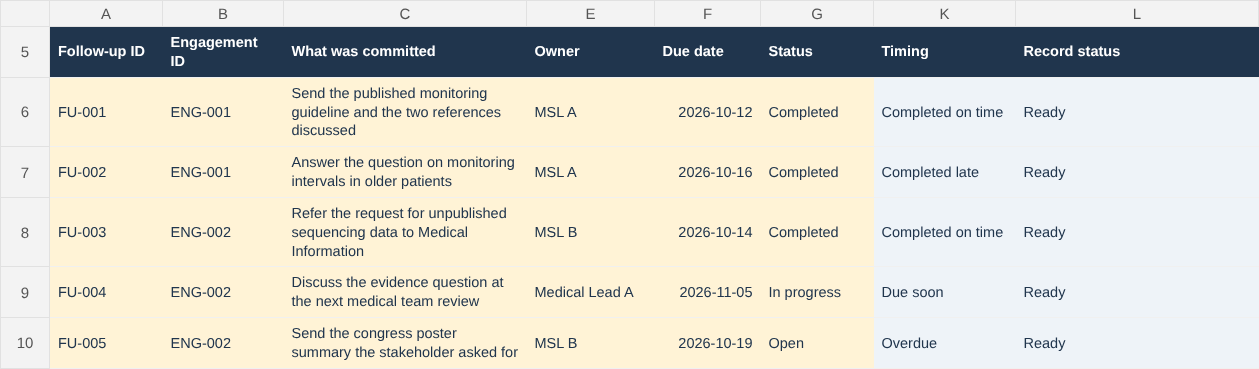
Rendered from the actual workbook. Select a tab to explore; click the image to view it full size.
See the workbook in action

4:01 · English · Fictional examples. The video loads from YouTube only when you press play. Watch on YouTube
From a promise to a closed loop
Record the commitment
Log the engagement, then one row per commitment: what, who and by when.
Route and follow
Choose the type, including referral to Medical Information. Timing shows what is due soon or overdue.
Close with evidence
Mark Completed only with a completion date and the record that shows it, and note whether the stakeholder was told.
What’s included
| Tab | What it supports |
|---|---|
| Start Here | Purpose, five steps, Medical Information and safety notes, timing rules, field definitions, capacity, colour key and how to move rows into the full system. |
| Engagements | Engagement ID, date, stakeholder code, format, owner, scientific topic and whether follow-up is needed, with follow-ups recorded, open follow-ups and record checks. |
| Follow-ups | Commitment, type, owner, due date, status, completion date and evidence, loop closed, calculated timing and record checks. |
| Summary | Open, overdue, due soon, completed on time and loop closed, by type and by owner, against a review date you can change. |
| Lists | Editable formats, follow-up types, statuses and owners (hidden tab). |
Prepared capacity: 200 engagements and 200 follow-ups.
All cells are editable. Amber cells hold manual inputs; blue-grey cells hold formulas. Overwriting a formula removes its calculation. Clear the fictional rows with Clear Contents before use.
Part of a larger system
The follow-up columns map to the Actions tab of the Stakeholder Strategy and Engagement System. The Start Here tab shows which columns to copy across.
What to know before use
Timing is calculated against the review date on the Summary tab, so example rows change as time passes. The on-time share is a prompt for discussion, not a measure of scientific quality. Record checks find duplicate IDs, missing fields, unknown engagement IDs and Completed rows without evidence or date. No macros, notifications or system integration.
Can I record adverse events or patient details?
No. Report adverse events and product complaints immediately through your approved safety process, and route individual-patient or off-label requests to Medical Information. The tracker records only the referral and its case reference.
Who is this workbook for?
MSLs, field medical teams and Medical Affairs managers who want every commitment from scientific engagements recorded, owned and closed.
Which software and purchase terms apply?
The file format is .xlsx. Works in Microsoft Excel 2016 or later, on Windows or Mac. No macros. One licence is for one person; for team use, buy one licence per user or email [email protected]. Refunds within 7 days if the file is faulty or not as described and we cannot fix it.
Included workbook: Field_Follow-up_Tracker_v1.0.xlsx
Missing something? Tell us which topic, tool or guide you would like next. We read every suggestion. Suggest a topic or tool
Read the approach behind the tool.
The companion article explains how to record, route and close follow-up commitments, with references.
Read the companion article